Job-site photo markup for trade crews

Circle it. Number it. Your whole crew sees it.

Mark up job-site photos on an iPad. Shrink video until it sends from the site. Walk the job talking and leave with a written Site Brief and a priced proposal, signed on the spot or sitting in their email ready to sign. One app for the whole crew, about a megabyte.

Opening to new companies soon.

$20 a seat, no minimum Installs from the browser in seconds Works with no signal
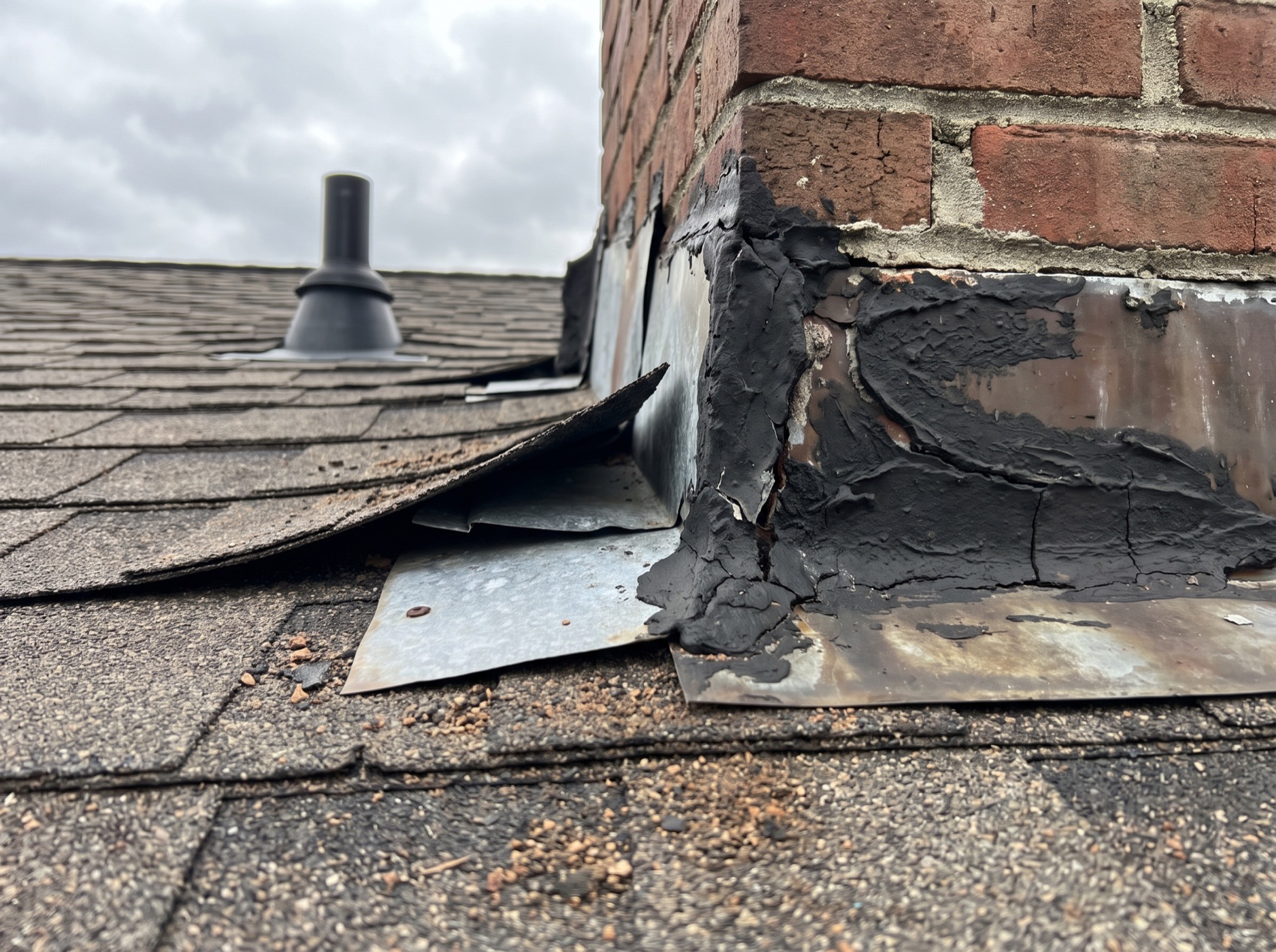
A brick chimney on an asphalt shingle roof with failed roof-cement flashing and a lifted shingle, marked up with numbered pins, a circle and an arrow
Pins keep counting across the whole job. Never renumbered.
Photo markup and messaging

Mark it up the way you'd mark up a print.

Pen, box, line, arrow, text and numbered pins. Any color on the wheel, any stroke width. Every mark is drawn in the photo, so it stays sharp at any zoom and on the client's copy.

Pen Box Line Arrow Text Numbered pin Crop Color wheel Copy to next photo
  • Pins count across the whole job. Photo 1 ends on 3, photo 2 starts on 4, and nothing renumbers behind you. The number on the photo is the number on the punch list.
  • Built for iPad, Surface, or desktop. Swipe photo to photo and move marks with a finger. No stylus needed.
  • The camera stays open between shots at full resolution. A room is a run of taps.
  • Talk about it right on the photo. @ someone and their bell rings; one tap opens that exact photo, pins and all. The conversation never shows up on the customer's copy.
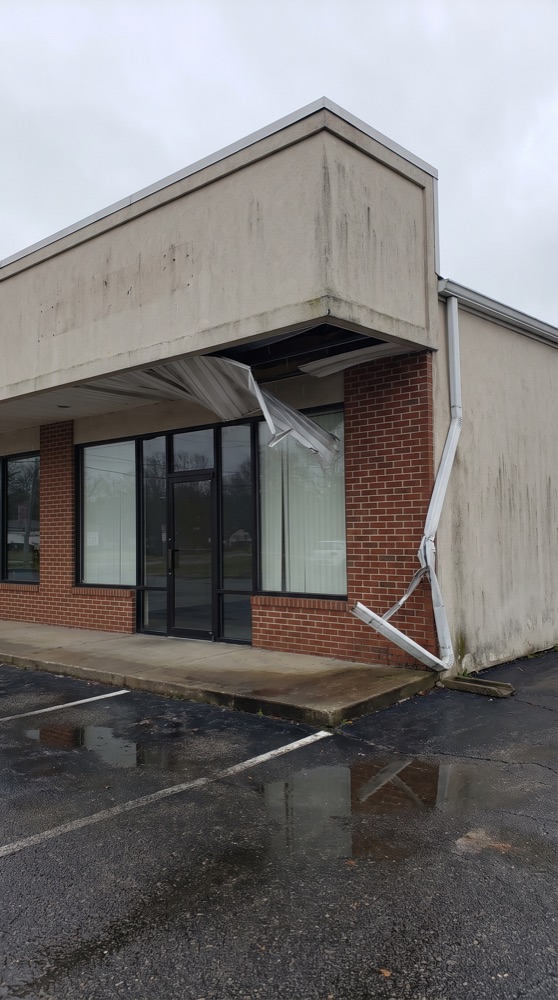
A storefront with torn soffit panels and a bent downspout, marked up with numbered pins, a box and an arrow
Photo 4 · conversation
@DaniR · 7:42 am@MikeT 13 gets a new downspout, or can we straighten it?
@MikeT · 7:51 amNew one. It's kinked in two places. Soffit at 12 goes back up first.
One walk, start to signature

Walk the job talking. Leave with it priced and ready to sign.

Talk through the job the way you already do. Before you're back at the truck there's a written Site Brief with every photo captioned, and one tap turns it into a proposal priced from your own list. Hand them the iPad to sign on the spot, or it's sitting in their email ready to sign. No retyping, no second app, no driving back with paperwork.

  1. 1Walk and talkOn site, even with no signal
  2. 2Site BriefBefore you're off the roof
  3. 3Priced proposalOne tap, from your price list
  4. 4SignedOn the spot, or from their email
1

Walk and talk

Shoot and talk. Every photo is tied to what you were saying when you took it, offline, so the notes land on the right picture every time.

  • A phone call mid-walk doesn't cost you the walk. Recording picks up again as a new clip.
  • Bilingual crews are transcribed accurately, in whatever language is being spoken, even when it changes mid-walk.
2

Site Brief

A customer-ready document before you're off the roof: what the job is, the scope by area, every photo captioned in the trade's words. Anything you said to check with the customer is called out. Preview it, then send a PDF with your logo on every page.

  • Delivered in the customer's language, any of five, written from the recording rather than translated after the fact.
  • Walk it with the customer and their asks are captured too, listed as requests beside your scope, so the extras they mentioned make it into the quote.
3

Priced proposal

The brief becomes a proposal in one tap: a line per scope item with the photo that backs it already attached, priced from your own list. Check the numbers, then get it signed. Your logo on every page.

  • Bring the price list you already use. Load a spreadsheet, a PDF or a photo of it, check what was read, and each line is matched to your prices.
  • Or let the price book build itself: after three sent proposals agree on a price, the app offers to remember it.
4

Signed

Hand them the iPad at the kitchen table, or it's sitting in their email ready to sign on their phone. No account, nothing to download, and a spouse can add theirs too. Both of you get the signed PDF with your terms attached.

In person or by link 256-bit encrypted, SHA-256 sealed
A contractor talking through a gutted kitchen while holding a phone as a recorder
An electrician landing conductors in a breaker panel
Electrical
A technician's hands on a rooftop condenser line set
HVAC
A painter cutting in a ceiling line
Painting
A commercial storefront with damaged soffit
Exteriors

Built for every trade. If the job has photos, they go here.

  • Roofing
  • Electrical
  • Plumbing
  • HVAC
  • Home builders
  • General contractors
  • Remodelers
  • Framing
  • Drywall
  • Painting
  • Flooring
  • Tile and stone
  • Masonry
  • Concrete and flatwork
  • Siding
  • Windows and doors
  • Gutters
  • Insulation
  • Solar
  • Cabinets and countertops
  • Welding and fabrication
  • Fire protection
  • Audio and video install
  • Water and fire restoration
  • Mold remediation
  • Waterproofing and foundation repair
  • Insurance adjusters
  • Home inspectors
  • Property managers
  • Property maintenance
  • Facility maintenance
  • Handyman services
  • Appliance repair
  • Landscaping and hardscape
  • Lawn care
  • Tree service
  • Irrigation
  • Fencing and decks
  • Pool and spa
  • Garage doors
  • Pressure washing
  • Window cleaning
  • House cleaning
  • Commercial cleaning
  • Carpet and upholstery cleaning
  • Move-out cleaning
  • Junk removal
  • Movers
  • Home staging
  • Auto dealerships
  • Auto body and collision
  • Mechanics and auto repair
  • Auto detailing
  • Paintless dent repair
  • Towing
  • Fleet maintenance
  • Heavy equipment repair
  • RV and marine service
  • Equipment rental

And the list keeps going. Solo operators, crews, shops and companies running subs: if you document the work with a camera, it fits.

Video

Video that actually sends from the jobsite.

Pick a target size and the video is compressed on the iPad before it uploads. Ten megabytes fits in a text. Fifty keeps the detail.

  • Save any frame as a photo at full resolution, straight into the job, ready to mark up.
  • Share through the normal share sheet: text, email, the customer's portal.
A contractor recording video of a demolished kitchen on a phone
Target size
Email-friendly10 MB
Standard25 MB
High detail50 MB
Customup to 75 MB
Job map

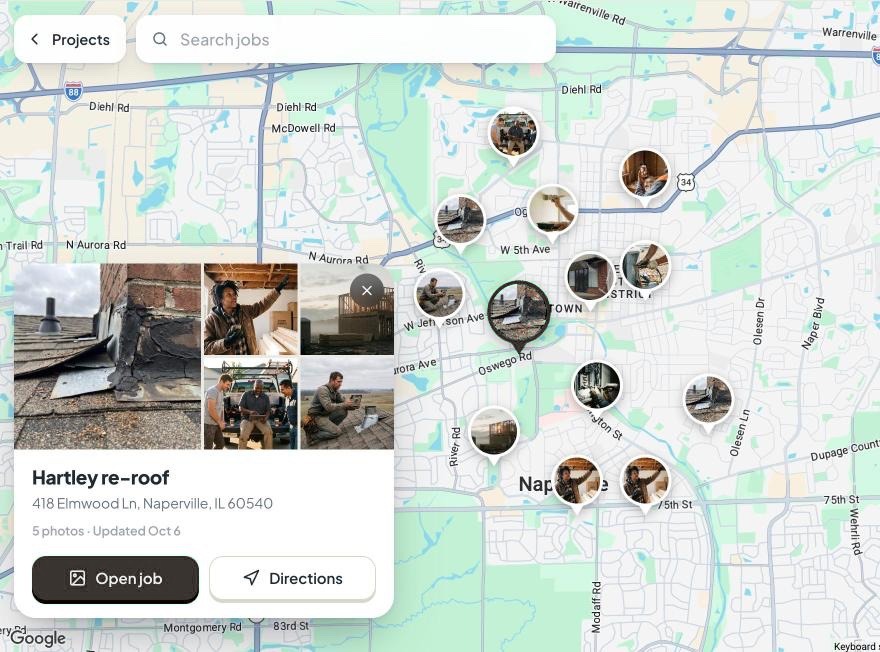
Show a prospect every job you've done on their street.

Every job with a site address is a pin on the map, showing its own photo. Zoom into their neighborhood, tap the roof two doors down, and the photos are on the iPad in front of them.

Photo pins Satellite view Search by name or street Directions Jobs near me
  • The work near them, with the photos to back it up. Pull it up at the kitchen table instead of describing it.
  • No setup. Add the address with the job and it's on the map.
  • Find a job by where it is. Search a street or a name, tap the pin for the photos, the address and directions.
The TradeReel job map: job sites shown as photo pins across a town, with one job's card open showing its photos, address and directions
Lightweight and offline

About one megabyte. Installs from the browser. Works in a basement.

No app store. No 300 MB download. Nothing to update. Open the link, add it to the home screen, and the whole app lives on the device.

~1MB
to install, over the air
5
platforms: iPad, iPhone, Android, Windows, Mac
3jobs
kept full-size on the device
90days
to bring back anything retired
  • Capture with no signal. Photos, markup and walkthrough audio queue on the device and push when you're back on the network.
  • iPads don't fill up. Recent jobs stay on the device; older photos come back the moment you open them.
  • Backed up to the cloud. Every phone and iPad on the crew sees the same job.
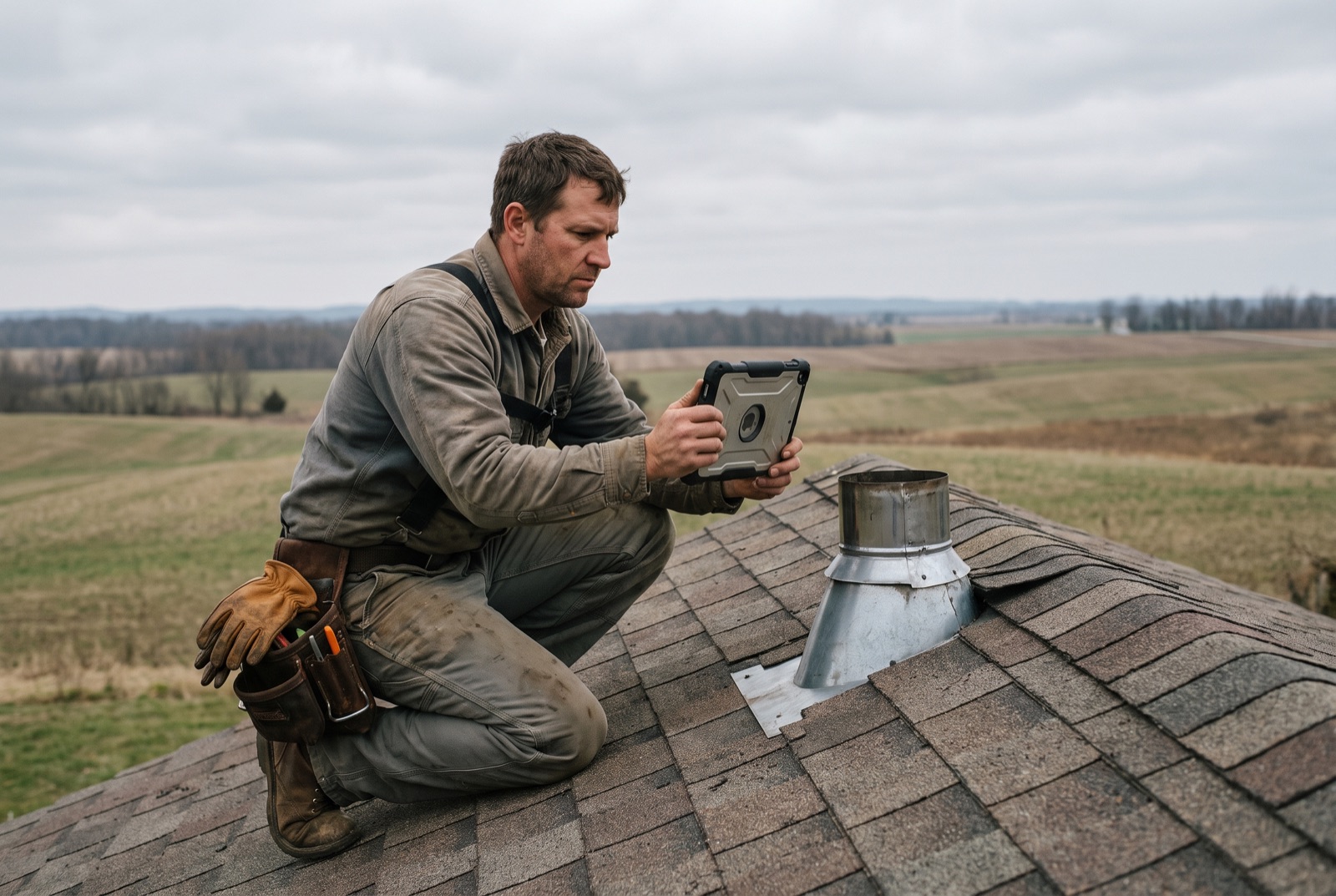
A roofer photographing chimney flashing on an iPad, farmland behind
Outbox
4 photoswaiting for signal
1 walkthroughaudio queued
Markupsaved on device
Crew and subs

Employees see everything. Subs see their jobs. Prices stay with the owner.

  • Invite by email. One link, a password, and they're in your company.
  • Cut a sub loose and they're out. Remove someone and their login stops working right then. No password resets, no leftover accounts.
  • Nothing disappears by accident. Anyone on a job can retire a photo. Only the owner can bring it back, for 90 days, from Trash.
Three tradespeople at a truck tailgate looking at an iPad together
EmployeeSees every job in the company
SubcontractorSees only the jobs they're put on
Manage crewCan put subs on jobs
PricesOwner grants this one alone
Pricing

One price. Everything in it.

No tiers to decode, no features held back for the bigger plan, no three-seat minimum. One person pays for one seat.

14 days free
$20per seat
per month
  • Everything. Photo markup, video, messaging, Site Briefs, proposals with e-signing, the price book.
  • 30 AI walkthroughs per seat a month, pooled across the company.
  • No minimum seats. Solo operators pay $20. A crew of five pays $100.
  • Add or remove seats any time. A seat is a person; subs count too.
  • Month to month. Cancel any time. No annual contract to get the price above.
  • Card up front, nothing charged until day 15.
Get early access
5people
TradeReel5 seats, month to month
$100/mo
CompanyCamCrew
$177/mo
JobberConnect
$149/mo
HandoffPro
$239/mo
$924 a year

$77 a month less than CompanyCam's cheapest plan for a crew of 5. And theirs is the annual-commitment price.

And no DocuSign on top. Their Standard plan is $30 per sender a month on a yearly contract, capped at 100 envelopes each a year. Signing in TradeReel is included in the seat.

Competitor prices are from their own pricing pages on 7 October 2026, on annual billing, their lowest price. Prices change; check theirs before you decide.

Side by side

Cheaper than the photo app. Priced proposals included. Fits in a megabyte.

Most crews pay for one app to take the photos and another to write the quote. TradeReel keeps the photo and the priced line on the same record.

For a crew of five TradeReel CompanyCam Handoff Jobber
Price per month$100month to month$177Crew, annual billing$239Pro, 12-month term$149Connect, annual billing
Minimum seatsNone1 on Core, 3 on Crew2 on Flex, 5 on Pro1 on Core; Connect sold in bands of 5
Each extra person$20$29Not published$29
Free trial14 daysYes7 days14 days
InstallFrom the browser, about 1 MBApp StoreApp StoreApp Store
Photo markup with pins numbered across the whole jobIncludedPhoto annotationNot listedNot listed
Video shrunk on the device before uploadIncludedNot listedNot listedNot listed
Conversation on each photo, kept off the client's copyIncludedCommentsNot listed@mentions on Plus
Spoken walkthrough to a customer-ready brief, in five languages30 per seat, pooledWalkthrough notesPro plan onlyVoice notes
Customer signs on the spot or by linkIn person or by link, 256-bit encryptedYesYesYes
Proposal with the proving photo on each lineIncludedNot listedAI estimatesQuotes
Works with no signalCapture, mark up, queueYesNot listedNot listed

"Not listed" means it isn't on their public pages as of 7 October 2026.

Coming from CompanyCam? See what your crew would pay

Questions

Straight answers.

Is TradeReel in the App Store?

No. It installs from the browser in about a megabyte and sits on the home screen like any other app. Here's how, for iPhone, iPad, Android, Windows and Mac.

Already using another app?

You don't have to switch everything at once. Load the price list you already use, invite the crew with one link, and run TradeReel on your next few jobs alongside whatever handles your scheduling and invoicing. Employees, subs and who sees prices are set when you invite them, and it's month to month, so there's no contract to get out of.

What's a seat?

A person. The owner is one, every employee is one, every subcontractor you invite is one. Each invite uses a seat, and you can add or remove seats whenever you like.

What counts as one AI walkthrough?

One walk of one job, however many clips it has. The credit covers transcribing all of it and writing the Site Brief in any or all five languages: English, Spanish, French, Italian and Simplified Chinese. You get 30 per seat per month, pooled across the company, so five seats means 150 shared, and the counter resets monthly. Run out and recording still works; the transcript waits for next month or another seat.

Can I use the price list I already have?

Yes. The owner loads it from Team, then Price book: a spreadsheet, a PDF or a photo of the sheet. The app reads every row and shows it to you to check before anything is saved. After that, proposals made from a walkthrough are matched to your list and priced from it, and the crew can pick an item on any line by hand. Work you keep quoting that isn't on the list is still offered to the book, so the list grows with how you actually price.

Can customers sign the proposal without DocuSign?

Yes, it's built in. Email the proposal from the app and the customer gets a private link. They read it and sign on their phone or computer with no account and nothing to download. Or hand them the iPad and they sign on the spot. A second person, like a spouse, can sign too, but it isn't required. Both sides get the signed PDF with a page recording who signed and when. Your company's own terms and conditions go out attached to every proposal.

How secure is signing?

Each customer gets their own private link, and everything is sent over an encrypted connection and stored with 256-bit encryption. Every signed PDF is sealed with a SHA-256 fingerprint and a certificate page recording who signed, when and from what device, so a doctored copy can be caught.

What AI is behind the walkthrough?

Two pieces. Purpose-built speech recognition turns the recording into a transcript, with a construction glossary and speaker labels. A leading AI model then writes the Site Brief and the photo captions from that transcript, in the language you choose. Both run from TradeReel's servers, the crew never deals with either directly, and your recordings are used for nothing but your walk.

What if the crew is somewhere with no signal?

They keep working. Photos, markup and walkthrough audio wait on the device and push when the network is back.

Who can see what?

Employees see every job in the company. Subcontractors see only the jobs they've been put on, and that's enforced where the data lives, not just hidden in the app. Prices are visible only to people the owner has switched on.

How much does TradeReel cost?

$20 per seat per month, month to month, with no annual contract and no minimum number of seats. Every feature is included. The 14-day free trial takes a card up front and charges nothing until day 15.

How does it compare to CompanyCam on price?

A crew of five pays TradeReel $100 a month. CompanyCam's cheapest option for the same crew is its Crew plan, which works out to $177 on annual billing. TradeReel has no seat minimum and no annual contract. Their prices as published on 7 October 2026; the full comparison is above.

Can I cancel?

Any time, from inside the app. It's month to month. If you cancel during the trial, nothing is charged.

Opening to new companies soon.

Fourteen days free when we open, card up front,
nothing charged until day 15.
Email us and you're on the early list.

Runs on iPad, iPhone, Android, Windows and Mac.